Autre

In this video, I break down five AI skills that actually matter in 2026, from defining problems clearly and testing decisions before acting to building repeatable workflows, connecting tools into one system, and knowing where human judgment must stay in control. Most people misuse AI by treating it like a prompt machine or a shortcut for finished output, but once you understand the structure behind good AI use, you stop chasing better prompts and start designing work in a way that creates leverage, consistency, and better decisions.
For inquiries: contact [at] jamesblueyt.com

I sit down with Ras Mic to break down how AI agents actually work and why most people are using them wrong. Ras Mic explains the mechanics of context windows, makes the case that agent md files are largely unnecessary, and shares his step-by-step methodology for building custom skills that make agents dramatically more productive. Whether you're coding with Claude Code or automating workflows with OpenClaw, this episode gives you the foundational knowledge to stop wasting tokens and start getting real results from your AI tools.
Timestamps
00:00 – Intro
00:42 – The Models Are Good Now
01:20 – How Context Windows Actually Work
04:55 – The Power of Skills
09:17 – How to create Skills
16:35 – Skill Maxxing
19:05 – What you need too build a project
20:40 – Recursively Building and Improving Skills
29:23 – Context Window Management and Token Efficiency
33:02 – Closing Thoughts
Key Points
* The models (Opus 4.6, GPT 5.4) are exceptionally good now — the differentiator is the context and harness you build around them.
* Agent md and claude md files get loaded into context on every single turn, burning tokens and degrading performance as the context window fills up. 95% of users can skip them entirely.
* Skills use progressive disclosure: only the name and description sit in context until the agent determines it needs the full file, saving thousands of tokens per conversation.
* The best way to create a skill is to walk through the workflow with the agent step by step, achieve a successful run, and then have the agent write the skill based on that real context.
* Recursively refine skills by feeding failures back into the agent and having it update the skill file so the same mistake is avoided going forward.
* Scale for productivity by starting with one agent and building up workflows before adding sub-agents — start simple, then expand.
Numbered Section Summaries
1. The Models Are Good — Context Is What Matters
Ras Mic opens by declaring that the current generation of models, Opus 4.6 and GPT 5.4, are exceptionally capable. The conversation is no longer about which model is "better" in a general sense. What matters now is the quality of context you feed them — that is what separates quality output from slop.
2. How Context Windows Work
Ras Mic walks through the anatomy of a context window: system prompt, agent.md files, skills, tools, the codebase, and the user conversation. All of these stack up as tokens, and the window has a hard limit (around 250,000 tokens). When you hit that limit, agents compact — and performance drops. Understanding this structure is the foundation for everything else in the episode.
3. Skills and Progressive Disclosure
Skills solve the token-bloat problem. A skill file contains a name, description, and the detailed instructions — but only the name and description are loaded into context. The agent reads the full file only when it determines the skill is relevant. This means a skill costs roughly 53 tokens per turn versus 944+ for an equivalent agent.md file.
4. Building Skills the Right Way
Ras Mic shares his methodology: identify a workflow, walk through it with the agent step by step, correct mistakes in real time, and only create the skill after you have completed a successful run. He illustrates this with his sponsor email screening agent — the first attempt returned all-positive results because the agent had no criteria for rejection.
5. Recursively Improving Skills
Even after a skill is created, the agent will still hit edge cases and fail. Ras Mic treats each failure as an opportunity: identify the error, have the agent fix it, then tell the agent to update the skill so the failure is documented. After five iterations of this loop on his YouTube analytics report generator, the agent now executes flawlessly across eight data sources in about ten minutes.
6. Scaling for Productivity Over Flash
Ras Mic started with a single agent handling everything — email, spreadsheets, research. Only after building reliable skills did he add sub-agents for marketing, business, and personal tasks. He argues that jumping straight to multi-agent architectures (or adopting tools like Paperclip without building foundational workflows first) optimizes for what looks cool rather than what is productive.
The #1 tool to find startup ideas/trends - https://www.ideabrowser.com/
LCA helps Fortune 500s and fast-growing startups build their future - from Warner Music to Fortnite to Dropbox. We turn 'what if' into reality with AI, apps, and next-gen products https://latecheckout.agency/
The Vibe Marketer - Resources for people into vibe marketing/marketing with AI: https://www.thevibemarketer.com/
FIND ME ON SOCIAL
X/Twitter: https://twitter.com/gregisenberg
Instagram: https://instagram.com/gregisenberg/
LinkedIn: https://www.linkedin.com/in/gisenberg/
FIND MIC ON SOCIAL
X/Twitter: https://x.com/Rasmic
Youtube: https://www.youtube.com/@rasmic

Steal my best AI secret codes & automations free 👉 https://sabrina.dev
33M+ views last month with Blotato. Special offer ends 4/30: 5000 credits ($30 value) + 5 Claude skills 👉 https://blotato.com
--
00:00 - Intro: The 8 Skills Separating Winners from Losers
01:32 - Skill 1: Strategic Skepticism (Stop "Shiny Object" Syndrome)
05:02 - Skill 2: Radical Adaptability (The "Child Mindset")
09:09 - Skill 3: Learning in Public (Building Authority)
13:09 - Skill 4: Context Engineering vs. Prompt Engineering
17:40 - Skill 5: AI as a Sparring Partner (Not a Search Engine)
19:33 - Skill 6: Vibe Coding (Building Apps with Plain English)
24:26 - Skill 7: Building Always-On AI Systems
29:13 - Skill 8: Documentation (The Fuel for Automation)
I'm Sabrina Ramonov. I'm on a mission to teach 1 million people AI. I'm also the solo founder of Blotato.com. It's a SaaS app for creators/entrepreneurs to go viral faster with AI, just like me (0 to 500k+ in 6 months solo).
How I got here…
0: Born in Quezon City, Philippines 🇵🇭
22 yrs old: Graduated UC Berkeley with degrees in Computer Science and Physics... and $250k in student loans.
23 yrs old: Started Qurious, as Founder/CEO, doing natural language processing (AI) in healthcare.
25 yrs old: Closed pilots with billion-dollar pharmaceutical companies, but failed to reach product market fit.
26 yrs old: Pivoted Qurious a lot, then settled on real-time call guidance for sales and customer support, combining streaming speech recognition (AI) and natural language processing (AI).
28 yrs old: Made the Forbes 30 Under 30 list, while living in a living room of 2BR San Francisco apartment.
30 yrs old: Sold 100% of Qurious to Pegasystems (NASDAQ: Pega) in cash and stock deal ($10M+ total).
31 yrs old: Integrated Qurious with Pegasystems Customer Service to launch Pega Voice AI, now used by 1000s of support agents.
32 yrs old: Started angel investing in VC/seed funds, crypto, and passion areas 🍄 while recovering from burnout by hiking, skiing, and reading. Dropped 50 lbs to get back in shape.
33 yrs old: Started making free content to teach 1 million people AI.
34 yrs old: 0 to 500k+ followers in 6 months with $0 budget, 0 team, $0 paid ads, 0 masterminds.
Today: Started https://Blotato.com to distribute 100+ pieces of content per week. 1000s of creators & entrepreneurs use Blotato to go viral faster with AI.
Get FREE AI prompts, playbooks, and agents 👉 https://sabrina.dev/p/free

Create Your First SKILL.md File (Make AI Agents Do Exactly What You Want)
Code A Program...
My API SKILLS.md - https://drive.google.com/drive..../folders/1F8atmPUU30
🚀 Discover Agent Skills: The Game-Changing Way to Control AI Agents!
In this video, I'll show you how Agent Skills are revolutionizing the way we work with AI coding assistants. Learn how one simple SKILL.md file can teach AI agents your exact workflow and coding style!
⚡ What You'll Learn:
✅ What Agent Skills are and why they matter
✅ How SKILL.md files work
✅ Progressive disclosure explained simply
✅ Real-world example: Building a REST API with custom rules
✅ Which major AI tools support Agent Skills
✅ How to create your first skill
🛠️ Supported AI Tools:
🔹Claude & Claude Code (Anthropic)
🔹Cursor
🔹GitHub Copilot
🔹VS Code
🔹Antigravity
🔹Kilo Code
🔹Goose
🔹Letta
🔹Amp
🔹OpenCode
🔹Gemini CLI
🔹Factory
more..
💡 Why Agent Skills Are Revolutionary:
🔹 Write once, use everywhere
🔹 No more repetitive prompting
🔹 Share skills across your team
🔹 Open standard, community-driven
🔹 Works with multiple AI platforms
🎯 Perfect For:
👨💻 Developers using AI coding tools
🏢 Teams wanting consistent AI outputs
🚀 Anyone building with AI agents
📚 Tech enthusiasts learning about AI
📚 Resources & Documentation:
Official Agent Skills:
🔗 https://agentskills.io/home
🔗 https://github.com/agentskills/agentskills
Platform-Specific Documentation:
🔗 Anthropic (Claude): https://github.com/anthropics/skills
🔗 Claude Platform: https://platform.claude.com/do....cs/en/agents-and-too
🔗 Google Antigravity: https://antigravity.google/docs/skills
🔗 Cursor: https://cursor.com/docs/context/skills
🔗 VS Code: https://code.visualstudio.com/....docs/copilot/customi
🔗 Gemini CLI: https://geminicli.com/docs/cli/skills/
🔗 Kilo AI: https://kilo.ai/docs/agent-behavior/skills
🔗 MUST TO WATCH NEXT:
Gemini Super Gems: Turn Gemini Into a No-Code AI App Builder (it's FREE) : https://youtu.be/jjxBUW-Ig2w
💬 Join the Conversation:
Drop a comment below if you:
Have questions about Agent Skills
Created your own skill
Want to see specific examples
Use any of these AI tools
👍 Enjoyed this video?
Like, subscribe, and hit the bell icon for more AI development tutorials and tips!
🏷️ Tags:
#AgentSkills #AI #CodingTutorial #Claude #Cursor #GitHubCopilot #VSCode #AIAgents #DeveloperTools #MachineLearning #AITools #Programming #SoftwareDevelopment #TechTutorial #AIAutomation #freeai #ai

Free Microsoft Certification Voucher Guide for AI Skills Fest 2026:
In this video, I walk you through the full step-by-step process for getting a free Microsoft certification voucher through Microsoft AI Skills Fest 2026.
If you are working towards a Microsoft certification and want to reduce the cost of your exam, this guide shows you how the voucher process works, what you need to complete, and how to check your eligibility once you have finished the required learning content.
I’ll show you how to register, complete the required playlist, and review what has been unlocked after completing the learning path.
This video is ideal for anyone preparing for Microsoft certifications in Azure, Power Platform, Dynamics 365, or AI, and looking for a legitimate free voucher opportunity through Microsoft AI Skills Fest.
Register here:
https://aiskillsnavigator.microsoft.com
Topics covered:
Microsoft AI Skills Fest 2026
How to register for AI Skills Fest
How to complete the required playlist
How to check voucher eligibility
How the free Microsoft certification voucher process works
Step-by-step guidance for completing the learning path
No AI skills, no job in future! #shorts #ai
Skills are the simplest way to teach your AI agent something new — and yes, it really is just a markdown file. In this beginner-friendly walkthrough, I'll break down exactly what a skill is, how it works, and we'll build one together from scratch in VS Code.
🔥 What you'll learn:
What skills are and why they matter
- The anatomy of a skill (SKILL.md, scripts, references, assets, evals)
- How context loading works — only what's needed, when it's needed
- How to create your first skill step by step
- Using skills across different agents (GitHub Copilot, Claude Code)
📂 Skill structure:
All you need is a SKILL.md file inside a skills folder (.github/skills/, .agents/skills/, or .claude/skills/). Add YAML front matter with a name and description, write your markdown instructions below, and you're done!
👉 Try it yourself: Create a "good morning" skill with your own name and personality, and see your agent respond exactly the way you want.
🔗 Find community skills: https://skills.sh
Also check out the blog post: https://dev.to/debs_obrien/wha....t-are-agent-skills-b
Next video: Deep dive into building a README generator skill with assets, scripts, and references.
#Skills #AIAgent #GitHubCopilot #VSCode #CodingForBeginners
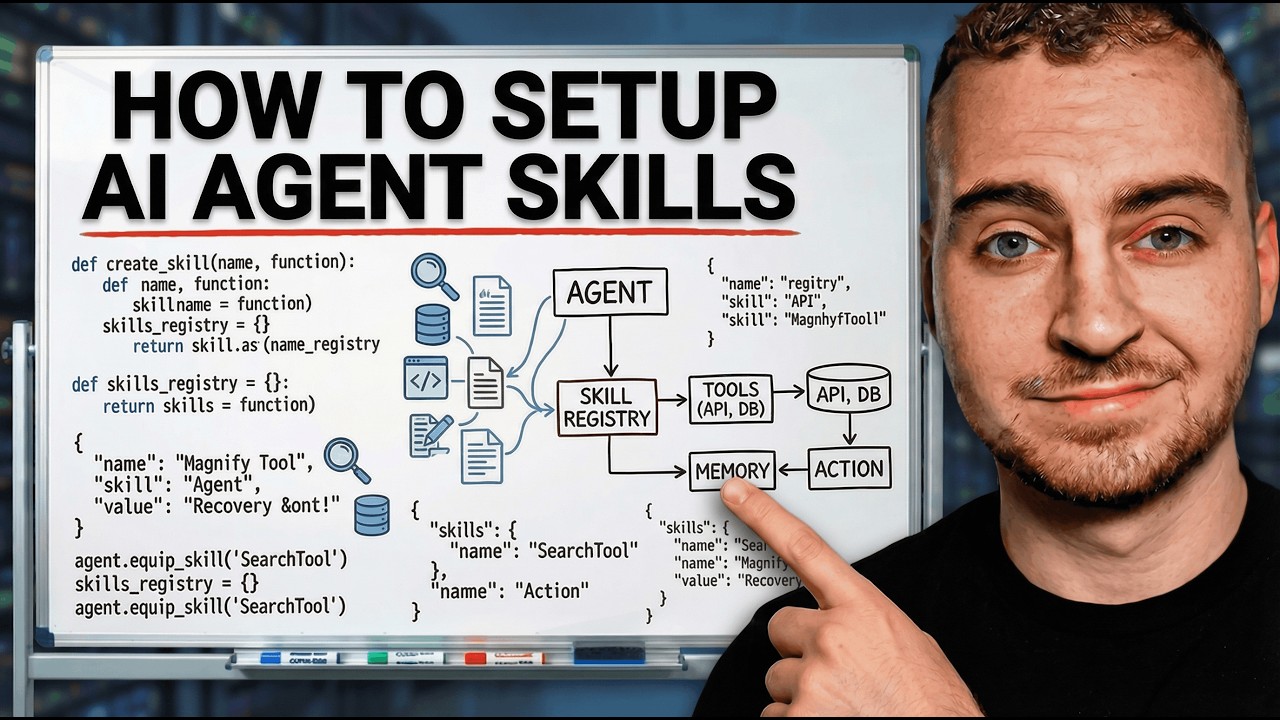
👉 Try TRAE SOLO Now: https://www.trae.ai/?utm_source=influencerglobal&utm_medium=meeco&utm_campaign=Techwithtim
The first 50 people to use this code get immediate access (first come, first serve): 6HGfcZq8
Most people using AI coding tools are just prompting and praying. They type something in, hope the output is good and when it's not, they start over entirely. But there's a feature that almost no one's using properly that completely changes how AI agents write code for you, and it's called skills.
🚀 Tools I Use
Get 10% off with code techwithtim
Openclaw setup: https://www.hostinger.com/techwithtim
VPS setup: https://www.hostinger.com/techwithtim10
Wispr Flow (Best AI Dictation): https://ref.wisprflow.ai/techwithtim
⏳ Timestamps ⏳
00:00 | AI Coding
00:26 | What Are Agent Skills
03:30 | New TRAE SOLO Tool
05:28 | Prebuilt Skills
06:45 | Creating Skills from Scratch
08:00 | Wispr Flow Dictation
12:01 | Multiple Skills
15:09 | Using Skills for Normal Tasks
18:53 | Rules vs Skills vs MCP
Hashtags
#TRAESOLO #AISkills #AIAgents
UAE Media License Number: 3635141